Headworx

Headworx is a collection of brainstorming ideas and thoughts on technology. Most are inspired by a group of friends of mine and many interesting things I come across everyday.

Subscribe: [RSS Feed]


Twitter updates

    Sunday, February 24, 2008

    FDE (Full Disk Encryption) Hard Drive
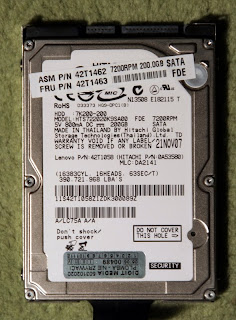

    We talk a lot about data security nowadays. From time to time we hear people lose their computers and the value of the lost data exceeds the value of the hardware by several orders of magnitude. Yes we all know we can encrypt data. But the encryption solutions available so far have always required a trade. Be more secure used to mean put more work into what you were doing. Set up some encryption software. Remember to encrypt files. Be careful where you store your encryption keys. And do not lose them. But do not keep them together with your data. And so on...

    Windows NT introduced encrypted file system a while ago. But it was never perfect. The encryption keys were stored on the same disk drive as the protected data. Not a good solution at all, as in case the drive was stolen, the thieves could recover the keys and decrypt the data. And not many people went to the extremes of storing keys on a separate device, like an USB dongle. And even if the dongle was used, the keys were leaving it temporarily, as most of the encryption algorithms were run by the main CPU, so the key had to be extracted from the dongle to the main memory. And in many cases that was just enough to make the entire protection very vulnerable. As in this case: http://blog.wired.com/27bstroke6/2008/02/researchers-dis.html.

    Of course there are more secure ways to handle encryption - do not let the keys leave the security dongle, just let the dongle encrypt your data. Yes, fine, but in this case the data has to be passed to the security device, encrypted there and passed back. Slooooowwww..... Hard drives are already the slowest components of modern computers, so why slow things down even more?

    Then Windows Vista came along with its BitLocker encryption engine. BitLocker is clever, as it relies on the TPM (Trusted Platform Module) - the security chip on the motherboard. TPM is engineered to securely generate and store encryption keys. They are released from the TPM as needed, but as the encryption is again handled by the main processor, the key has to leave the secure TPM module. To be honest, when I got my new laptop two months ago, I was tempted to try the Vista BitLocker feature. Until I learned it was not available in Vista Business and I really was not in mood to do any upgrades to the OS I was having hard time falling in love with. The only thing I did was checking the number of BitLocker - related bugs in the Microsoft Knowledge Base. The list was long. With scary titles signaling potential data loss or recovery problems. No thank you. And of course, as BitLocker is an OS - level solution, using it degrades performance (who would want that?).

    At 2007 Telecosm I spent a few hours at the bar with Steven Sprague. Steven is the CEO of Wave Systems (http://www.wave.com/). Wave is the leader in security applications and a company behind the entire TPM concept. While I am not a big fan of TPM itself (at least not for all the applications), I was really interested in the FDE drives, Wave made together with Seagate (the so called Seagate Momentus FDE). FDE drive - in short - is a disk drive with security processor on board, encrypting the data on the fly. Steven explained to me the FDE did not require any special support from the OS. The drive is fully autonomous. All it needs is a BIOS supporting ATA Security commands. The security chip on the drive generates a unique AES key to encrypt all data. When the drive is not locked, the key is always released by the security processor and data is transparently encrypted on writes and decrypted on reads. Hence it works just like normal drive, you can write / read anything to it. The only difference is, what is actually written to the drive platters, is AES-encrypted. When you lock the drive (by setting a password in BIOS), the password you set is a wrapper for the key. The security chip on the drive releases the key only when you enter the right password at boot time. Easy and transparent. Buy an FDE drive, install whatever you need on it (the OS and your programs and data) and when you are happy, just set the BIOS password. The data has already been encrypted, and by setting the password you are taking control of the encryption key.

    Today the FDE drives are the most secure option to protect your data on a hard drive. And they are the least troublesome option at the same time. From the user's perspective, the overhead is very low - just to enter a password at boot time. No extra software, installation, maintenance, special partitioning needed... Almost plug and play. Plus there is one extra benefit. When you want to wipe the drive, instead of reformatting it, just drop the encryption key. The data left on the drive will be just a noise from that point.

    I upgraded my Thinkpad to FDE drive last week. Instead of Seagate I went for the Hitachi 7K200. The Hitachi drive is based on the same concept, yet is more spacious and faster than the Seagate (7200 vs 5400 RPM). The upgrade was a piece of cake by means of the Acronis Migrate Easy 7.0. The entire migration process took less that 3 hours. And now my data is secure. One day every drive will be an FDE drive...

    PS. A couple of good links if you would like to dig a little deeper into the FDE subject:
    http://www.wwpi.com/index.php?option=com_content&task=view&id=2943&Itemid=44
    http://www.wwpi.com/index.php?option=com_content&task=view&id=2669&Itemid=129
    http://security-basics.blogspot.com/2007/01/introduction-to-full-disk-encryption.html

    Labels:

    Sunday, February 17, 2008

    Blue-Ray vs HD-DVD... and the winner is...?


    I am having fun standing on the sidelines and reading all the comments heralding the victory of Blue-Ray over HD-DVD. Believe me. It does not really matter. Yes I agree Blue-Ray took the first podium place, leaving HD-DVD behind. I even like what has happened, selfishly, because I do like the Sony PS3 game console for its no - compromise design, and as you probably know, the Playstation 3 is by far the best Blue-Ray player. The recent Blue-Ray victory will drive the PS3 sales, accelerating the market penetration and this way creating more and more content (games and on-line services) for the console. So that is good for PS3. But aside from the PS3 effect... does it really matter which high - definition TV disc format won the battle? Only for a very short time period...

    Blue-Ray will repeat the fate of the SACD, the high definition audio format aimed to replace audio compact discs. It will be one of the shortest living new product / technology of the recently introduced. Before it develops a meaningful market (that means most of us having a Blue-Ray player at home and at least a HD-Ready TV Set), we will turn to on-line, Internet-based, personalized, on demand video services.

    People are generally lazy. And impatient. And don't like to plan ahead. And want to have a lot to choose from. And like to be able to try before buying. So if I want to watch a movie now, and I have a choice of either picking any movie ever made on the Planet by clicking a button on a remote, or getting up from my sofa, and going out to buy or rent a Blue-Ray disc, I will choose the former, even if the quality is "just" a DVD-quality. Laziness, convenience, always wins consumers. Just look how many people use MP3 players (have not you heard MP3 degrades the audio quality?) versus how many of them have SACD systems (and discs!) at their homes... Of course there are audiophiles and there are videophiles and even myself I will be buying an number of Blue-Ray versions of the movies I really like. But only a few I have a reserved place on my shelf for. But for everyday evening movie we will pick the convenience of the on-line video on demand service. Like the one that has been available for more than a year now in Poland (videostrada TP or multipakiet TP). And as the current copper ADSL connections will soon be upgraded to fiber or at least VDSL, paving the way for high definition on-demand, personalized television experience.

    So do not cry if you are left now with an XBOX-360 or another HD-DVD player. Soon your console or set-top-box will be the gateway to the entire movie collection of the World. Just make sure you are properly connected...

    Labels:

    Monday, February 11, 2008

    Tired With Gadgets


    We live in a world, where marketing and hype exceeds the reality. This once was a "new school" of business. Now it looks like it is more and more the old school. People are tired with underperforming gadgets, promising to deliver excitement and joy. More often than ever, frustration is what they really deliver.

    I wrote about Windows Vista a number of times. A great example of a premature, overhyped product. Poor performance, and no meat, only the Aero Glass and Blue Screens (recently my laptop showed a blue screen of death reporting an exception in the Microsoft Winsock driver... Well I know Microsoft used to blame third party device drivers for the crashes.... But hey, bugs in the winsock library?... that means the product launch was way premature. Just a perfect example of what happens to a company when it is run by a bottom - line focused COO...

    Windows Media Center Living Room PC? I spent two days last week trying to set up the video drivers to display correctly on my 1080p TV. In the meantime have just learned the Media Center is nothing more but a small application running on top of ordinary Windows XP... Hype, hype, hype...

    My Samsung SGH-i600 smartphone cannot handle situation when it is paired with more than one Bluetooth handsfree device. When I pair it with a headset, it does not see my car handsfree and vice versa.

    The Nokia N800 has its ups and downs with avery new firmware release. It looked almost fixed three weeks ago (GMail started working fine), but then again the Google Reader shuts it down. I know this may be a bug in the Reader application itself, in the browser, in the OS or even a hardware problem, but all I get is frustration with such promising device.

    Tomorrow the Mobile World Congress starts in Barcelona and companies are racing with press releases. SonyEricsson introduced the Experia X1 Windows Mobile device. Looks great, but an hour ago when I tried to see the details of the HPM-77 handsfree accessory, I got 404 Page Not Found after clicking the link on Sony's page. Frustration again. Why the rush?

    The bottom line for today is people pay more and more attention to the overall quality and experience. And there are just a few companies understanding that. Apple is the number one here. Look at the prices of the overpriced Apple products and try to figure out why people prefer to pay a premium for them... Quality and reliability and ease of use. You can charge a high premium for these and consumers will pay and will be happy.

    Labels: ,

    Sunday, February 03, 2008

    Eliminating The PC


    As readers keep on following my blog, one trend I favor seems to be quite visible. To eliminate the PC. I have covered many gadgets with various functions and most of the time these functions could be handled by a PC. Be it a file server or a firewall / router or a gaming console, you can have them all implemented as a software running on a general purpose personal computer. But is this really a good approach?

    Last week I was completing version 2 of my living room setup. I ended up with a Full HD LCD screen with a HDMI input (boy, they are cheap now!). The HDMI input is coming from a Denon AVR-2308 audio amplifier (featuring HDMI 1.3a switch / repeater). The Denon strips audio signals from the HDMI stream to power speakers and passes video up to the TV Screen. There are two HDMI inputs on the Denon - one is connected to the Sony Playstation 3 console and the other to the Sony VAIO VGX-XL100 so - called a "living room PC" running Windows Media Center.

    There is an enormous user experience gap between the Playstation and the Media PC. Playstation boots instantly, requires no setup and plays games, Blue-Ray, DVD, music, pictures from the ReadyNAS DLNA/ UPnP server. The PC - on the other hand - kept me for six hours with the Windows setup and later I spent similar amount of time trying to adjust underscan / overscan ratios of the NVidia graphics unit until it really started to fit the native 1920x1080 resolution of the LCD screen. Now after being set up, the living room PC boots for a minute or two (I cannot turn it on with the supplied remote) just to present more or less the same functionality as the Playstation. The bottom line is obvious. PC's - while universal - deliver more hassles than features to ordinary users.

    One of the difference + making gadgets I follow for a while is the Eye-Fi WiFi/SD card. The Eye-Fi guys took the original concept of a combo WiFi/SD card and exteded it with some clever software that lets us upload pictures directly from a digital camera to one of the photo - sharing sites (Flickr, Picasa), eliminating the PC from the picture transfer path. With this ingenious move, many more happy users will enter the world of digital photography. In many areas elimination of the PC's enables new users.