Posts

Showing posts with the label wifi

Nixie Sync

Image
The Karlsson Nixie clock (by Peter van der Jagt 1997) is very stylish. One of the first of the kind and definitely setting the trend. Unfortunately it does not hold the time after a power outage. For quite some time I was thinking of adding a time synchronization module. Initially the idea was to use the long wave radio receiving the DCF77 signal. DCF77 is increasingly more problematic as the 77kHz frequency is impacted by the totality of high frequency digital power supplies that generate lots of radio noise. The alternative is of course fully digital, relying on an Internet time source, based on the NTP protocol. Surprisingly (or not) the NTP-based module has proven to be super easy to build these days (...with the help of AI). Actually I wanted to kill two birds with one stone: have the bloody clock display the right time and also test Claude's capabilities as a junior embedded software / electronics coworker. Both goals have been achieved. I found it entertaining, educating, ...

5G Beats WiFi

Image
5G (cellular data) generally beats WiFi. That is my conclusion after the recent travels in Asia and North America. Public WiFi has aged. In most places it has probably stayed at the 802.11g (50Mbps) while 5G is typically 5-10x faster. On top of that the WiFi backhaul in many places is slow too. And very often has many restrictions. Of course 5G costs (some) money and WiFi is theoretically free. But then you probably remember that meme where "no internet" and "fast internet" are smiley while "slow internet" is the angry face. Which is very true. Speaking of WiFi restrictions - some are well known and kind of obvious (like Google services being blocked in China), so for a westerner entirely reliant on GMail, Google Maps, etc., a roaming eSIM data plan is probably a must. Also WiFi is probably the only technology thing in China which is universally bad. Budget hotels, premium hotels, factories, offices - all are slow (and restricted). 5G on the other hand is ...

eSIM Revoluts

Image
I blogged about eSIMs last year. Among all the features which make my phone great, this is the one of the most used. Mobile data abroad has always been an issue due to outrageous pricing plans. So travelers seek alternatives. Of course free WiFi here and there helps but it continues to be shaky and slow. And only available in more inhabited places. But move further into the wilderness and there is no WiFi. While mobile (mostly LTE and 5G) continues to be available. And speeds are decent (LTE) to great (5G). The problem with 5G is that you can easily transmit data at a rate of many dollars per second and also quickly exhaust the "global" allowance from your home carrier. My recent experience shows you should plan for 1GB per day for moderate use (uploading photos, checking maps etc) to multiple of that if you want to upload trip videos. The solution of course was to swap SIM cards to a local prepaid plan, but that required physical shopping. Now with eSIMs the local data rate...

Wireless CarPlay Upgrade

Image
Call me late, but I now have wireless CarPlay in my 2005 Subaru. It is as convenient and seamless as car-phone integration can be. It started way back in 2016 when (after driving for 9 years a civilian version of the Forester II / SG) I fell in love with the Japanese Domestic Market (JDM) STI-version of it. And during multiple upgrades I installed the Pioneer AVIC head unit equipped with Android Auto and Apple CarPlay technologies. The radio has ton of features (including its own GPS/mapping subsystems and SD-card based music library) but really the bright spot is the large capacitive touch display. And the phone interfaces of course. While the cable versions of Android Auto and CarPlay have of course been great (a single cable to connect/integrate the phone and charge it), they are not that super convenient during short city / commuting trips. I made a small upgrade by installing the magnetic cable , but it still required removing the phone from a pocket. Until I finally decided to p...

Background Drain

Image
In my Off Grid post about New Zealand tramping I mentioned being quite happy (if not really surprised) with the performance of the iPhone battery. If not touched it was draining less than 5% a day, and up to 20% under normal off grid use - mostly taking photos, using offline topographic maps with GPS and writing up a small journal entry at the end of the day. These statistics clearly show the phone does nothing in the background. Which is of course possible when the airplane mode is active and it does not even attempt to find a network. But the airplane mode cannot be used during normal busy days, can it? Surprisingly yes, it can. Like in an airplane you can still have WiFi active and connected. And iPhone (depending on your SIM card / cellular provider) can support "WiFi calling" which technically is tunneling the cellular connection over WiFi. While it may sound weird to many, it actually is a super useful feature. And actually one of the reasons i decided to switch to iOS...

900Mhz Long Range WiFi (HaLow)

Image
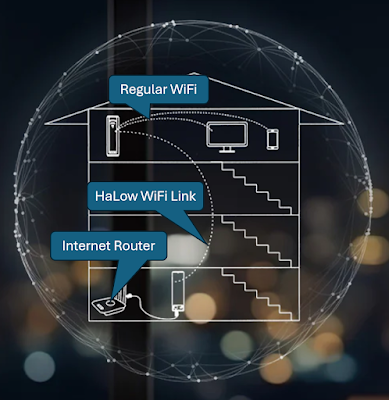
One of the most common complaint on WiFi is the range is often not sufficient. You have this door bell / camera by the property gate which does not connect or a thermostat in the basement. WiFi mesh systems help solving some of these problems (while introducing others), but in some situations you simply need more per-hop range. In commercial / industrial environments, such as served by Bluetooth mesh / Bluetooth NLC networks this is rarely an issue (Bluetooth can reach really far if properly configured), home users would clearly benefit from something like long range WiFi. If it existed. And actually it does exist. The standard is called 802.11ah (or HaLow) and is a long range WiFi standard, operating in the sub-GHz frequency band. Lower frequency comes will much lower throughput, but it has the benefit of lower attenuation. In short - it passes through more walls or goes longer distance. As this is a different radio frequency, none of your laptops of smartphones are able to connect to...

iOS: 2 Weeks In

Image
As promised a quick update after 2 weeks with the iPhone 15. It seems there are many hardware / software features Apple does not talk about. Or people just don't care. The first is - already mentioned - the great keyboard. This is purely an iOS 17 improvement, as after the upgrade the iPad keyboard started behaving the same. Super accurate predictive text and corrections and no need to switch languages anymore. Just type. Like on a BlackBerry :) I make less way typos and errors. Another are camera improvements. I've yet to try them, but supposedly there is some magic when taking long exposure astro photos. When the phone is steady (e.g., on a tripod) and the subject is dark, the night mode shutter can go up to 30 seconds. At 30 seconds you would already see small star trails but they are supposedly being removed . A kind of behind-the-scenes image post-processing AI magic like the keyboard? Maybe... I need to try it. The magsafe system of accessories is yet another great little...

Move to iOS

Image
It has happened - I have an iPhone now :D. USB-C was the deciding factor (or - the lack of USB-C previously had been deterring me from buying an iPhone). So thanks the EU! And of course everybody agrees Apple sticking to the lightning port on iPhones for so long was just stupid. My initial thoughts are generally good, some very good, and some surprisingly bad (although the bad ones a just minor, but unexpected...). Probably the worst part was the initial setup. I wanted to move my data over (both from the Android phone and the iOS iPad) and I read about the data transfer bug in factory fresh iPhones, so did as requested and right after unboxing plugged the iPhone to iTunes. That is like time travel. iTunes was never great but now it is exactly the same like it was 20 years ago, so considering the overall progress this is terrible. But the phone was updated and I started setting it up. It recognized the iPad (the "device" nearby) and froze for more than an hour. During that ti...

The Craftsmanship Gap

Image
One big gap which exists in one of the most popular consumer device categories is the missing link between standalone cameras and smartphones. I wrote on this a number of times before . Of course the fundamental gap is the lack of a full-stack communications standard. One that would allow any phone to connect to any camera without a special dedicated app for that particular camera. It sounds super obvious and in the past there even was a digital camera working group at Bluetooth SIG. But that group never produced anything (any specification) reaching the adoption phase. Clearly members of that group did not have enough motivation to create the standard They clearly thought they would achieve better results doing it in a proprietary way. But even in a proprietary way - they failed. The cameras' smartphone apps are infuriating - writes Richard Butler at DPReview. Yes they are. This statement probably does not apply to the latest - meant by design to be connected - photo and video ca...

Offline Use

Image
May apps, in particular multimedia apps have so called "offline mode". Often available in the premium subscription plans. Like YouTube, Spotify but also navigation apps, including Google Maps and my favorite - FATMAP . I use these offline options very often - either during off-grid trail hikes or for watching movies / listening to books and podcasts during flights. Unfortunately these offline modes are very often broken. They need online Internet to start doing something. A couple of weeks ago I tried playing a movie I purchased and downloaded for offline viewing and it would not work. As the plane was taxing towards takeoff, I managed to turn back my phone, turn the mobile WiFi hotspot on and let the tablet communicate with the Internet to kick off the playback of the downloaded movie. Similar thing happened to me recently with Spotify - it refused to play a downloaded podcast episode due to the lack of Internet access. The green wheel kept spinning forever. And this happens...

The Details

Image
The legacy - originally Japanese - photo camera business has been increasingly challenged by smart phones. This is obvious now to almost everyone and it is hard not to admit the SLR, and even the mirrorless cameras, have become a niche of a niche of a niche. Of course this was inevitable, as many (most?) people are just fine with the photo quality offered by today's phones. And the problem is the overall user experience - from taking a photo to having it corrected and archived or shared with others. Nothing has changed there for the last 20 years. Clumsy cables, memory card readers, unintuitive software. I remember it took me many hours of tutorial videos to understand the concept and the basic features of Adobe Lightroom. On the other hand anyone can start using Apple Photos or Google Photos without any learning nor training. My curiosity has pushed me recently into making time lapse video clips. It is a pain using a DLSR. You need to manually calculate all exposure parameters tha...

iPad Battery Swap Woes

Image
As briefly mentioned in the Nov 6 post , it was time to replace the dying battery in my iPad. Apple does not do that. I mean, they do, but instead of replacing the battery they sell you a new iPad (the same model and configuration) and you give them the old one. This is clearly because of the super low "repairability" score mostly due to the "Gobs of adhesive hold most everything in place, making all repairs more difficult.". A local non-Apple-authorized service shop offered the battery replacement so I was eager to accept this offer. It took them a week after which they returned me the device with a new battery but broken WiFi (and Bluetooth). There was clearly something wrong with the 2.4GHz antenna, as WiFi reception was bad and Bluetooth was choppy. I returned them the device, they kept if for another week and returned in the same state - broken WiFi. Clearly they did not have skills nor testing tools / procedures to to fix what they broke. And I was afraid the...

Hotel TV

Image
Hotel TVs are one of the artifacts of the past. No hotel probably even thinks of providing a room without a TV. Sure, you can have a room with a shared bathroom or without a window. But there is always a TS set. I wonder who watches them. These days most people watch their personalized content. Typically they are just fine with the endless scroll on social media but some do watch YouTube or other paid (subscription) Internet-based video services. And then they arrive at a hotel and do what? Watch the broadcast TV? I don't think so. At least I don't do it. Although it would be nice from time to time to watch something from a bigger distance and on a bigger screen (bigger than my 10" iPad). Some time ago I added a nice 90-degree USB-C - to - HDMI adapter to the cable bag  (other than that there have been no updates, and I'm very happy about the "cable" things have stabilized, mostly due to the USB-C all-capable standard). This adapter has two use cases. The pri...

Automatic Updates

Image
In the previous era software updates were significant events. Not only they did not happen automatically, but even to check if there was one, you had to do some special things. Look up a web page, download the installer package, uninstall the previous version, remembering to save settings somewhere, then run the new install and restore the settings. Then appstores came around, popping up notification bubbles which were inviting to download and install updates. Now the updates are gone. Not that they are not anymore, but we mostly just don't see them. Both Apple and Google have hidden the updates and they execute kind of behind the scenes. And it works for most people, But then there are some devices which can be considered a part of the "infrastructure" and updating them fully automatically probably is not the best idea. I have the Firewalla boxes on my home networks and despite being very happy with them I have never pulled the trigger to switch the networks to be Firew...

End Of Life

Image
Google sent me this "Christmas gift" message three days ago. Yes I had heard the rumors. And it is both sad and surprising. I have been using the OnHub WiFi for several years and it has been great and flawless. After experimenting with several WiFi access points, this one has been the first one to fully cover the house. And I never ever needed to reboot it. It has been invisible. The best technology is invisible - it just works. But due to the support / end-of-life policy I will have to go through the hassle of selecting / installing / troubleshooting a new device while trashing the perfectly functioning one. This is the insanity of the Internet era. I can - to some extent - understand the upgrade cycle of devices which do gain significant functionality. Smartphones are among them but even they hardly need replacements every year or two. But WiFi? At some point it is just good enough and replacing an access point just does not make sense. Vendors really do need to start think...

Solis Roaming Data

Image
Mobile data while roaming is both salvation and a nightmare. It helps a lot from the moment you touch down at a new place. But due to astronomically high roaming charges, travelers very often fear to turn it on, trying to rely on sporadic open WiFi hotspots. Companies like Truphone have solved most of that already. I have been using Truphone for 5 years now , with a great success. But most is not all and even Truphone with its global plan covering more than 100 countries, while covering "most", they still do not cover them all. Fortunately, there are several companies addressing the roaming data problem. When planning my recent trip to Kazakhstan, I decided to go with Skyroam , selecting their Solis device. The idea is simple: it is a personal WiFi access point that magically links to the cloud in a way that costs you around 8 EUR per 24 hours. And you can connect multiple devices. I selected the Solis for two reasons. One was the battery lifetime, advertised to be...

Privacy

Image
Privacy is a swinging topic. On one hand we seem to not care at all with open social media every time and everywhere. But on the other hand we start to understand. And care. Privacy is also a very important topic from a system design perspective. It is very delicate and has to be taken care of since the very beginning. In wireless networks we talk a lot about security. Key exchanges, encryption, authentication. But how about privacy? It is not all that rosy everywhere...While the modern wireless systems seem to had learned how to do proper encryption (and that includes learning basic things like a nonce), many of them don't protect privacy properly. Or even at all. The culmination of misunderstanding of privacy was at the dawn of IPv6, when we were triumphant saying that every grain of sand could have an IPv6 address, not to mention humans of course and all their [connected] belongings. The addresses would be static - of course. That means every grain of sand could be traced....

Wireless Just Works

Image
Application by application, category by category, wireless is taking over wired connections. Anyone remember WiFi around year 2000? It was hardly working... Today? It is really rare to find a hot sport that has connectivity issues. And almost nobody uses wired LAN in an office. Same with mobile phones. Remember land line phones? Remember choppy mobile calls quality? It is all rock steady and crystal clear today. Especially when high quality, wideband  audio codecs kick in on both ends of the connection. High speed Internet was one of the remaining applications ruled by wired. It still is where the "wire" was changed from copper to glass (fiber). But not everyone is lucky to get fiber to the home. Those stuck with copper DSL could only sit and wait. I was among them. Until I decided to try wireless, the mobile wireless offered by mobile carriers. It is simple - go to a shopping mall, visit T-Mobile or Vodafone or whoever is your mobile carrier and ask them for a WiFi rou...

Radio Convergence

Image
Every couple of days I'm asked about the future of wireless standards. How is the landscape going to look like  a couple of years from now? Companies are placing their bets. The conventional wisdom has been the number of wireless standards would never be reduced. I strongly disagree with this view. Actually within a few years we may be down to just four. While there are always niche applications requiring some specific radio features, the majority of applications will converge around these radio families: LTE / 5G for anything outdoor. Mobile telephony, mobile wide area data (high speed and low speed). WiFi for generic purpose indoor Internet access for high power devices (such as phones or personal computers). WiGig for ultra high bandwidth applications such as wireless displays and wireless storage (this may include digital cameras if the industry gets together and defines application profiles, which it should have done 15 years ago). Bluetooth for anything that is defin...

Security Musings

Image
What a week! WPA2 has been proven vulnerable to nonce reuse : reinstall and old key as a new key and it starts using the old nonces again. Nonce (a number used only once) is a key concept in the AES cipher. I think most issues implementations have with AES are related to handling nonces and making sure they never are used twice. Nonce has also been central to the Bluetooth mesh architecture and the way it is designed makes the mesh stand apart from other low power communication systems - we have a nonce that is never reset and still occupies effectively only 3 octets in a message. See Section 3.8.5 for details. But that nonce problem in WiFi is not really a serious problem... Because who cares today if a WiFi network is secure or not? Airports, cafes, public hotspots... do we ever really rely on security of these? The answer is no. We rely on the security of our devices and on end-to-end protocols. We've reached the LAN's end. WiFi should not bother about security anymor...