Headworx

Headworx is a collection of brainstorming ideas and thoughts on technology. Most are inspired by a group of friends of mine and many interesting things I come across everyday.

Subscribe: [RSS Feed]


Twitter updates

    Monday, June 29, 2009

    So what is in my holiday gadget bag?


    I continue to enjoy my holidays, traveling across the United States. I remember twenty years ago when I went to Australia, the only piece of electronic gear was the Sony Walkman, with six audio cassettes and a pair of alkaline AA batteries. And then I bought a small AM radio to stay in touch with the world. No cell phones, no Internet at that time. I also remember a GPS leaflet by Magellan, stating prices "starting" at $19k for a device capable of displaying coordinates on two line character display. Times have changed a lot since 1989.

    Actually today I have just realized I carry four GPS devices with me:

    1. The Garmin Nuvi 250, with City Navigator North America map on a SD card, sticked to the windscreen. Very simple, reliable and faithful gadget. I rely on the CNNT map everyday and use it to help finding various points of interest along the way, including gas stations, grocery shops and lodging.


    2. Then there is the Garmin Colorado 400t. It has a very detailed US Topo map built in. And it is fully waterproof (tested yesterday on a whitewater rafting trip on the Colorado river). Generally the 400t is a gadget, as the type of my current trip does not require detailed topographic map - all the National Parks have usual paper maps that are more than sufficient. But it serves one important role: saves the track log. For some reason the Nuvi 250 does not have the track saving feature. But I definitely wanted to have a detailed track of the entire trip, as I hope to use it later to create a memorable presentation, including pictures taken, log of the trail and some more information from services like Google Earth. Actually I don't know if Garmin's log can be used for that purpose, but hope there are services (or file converters) that will allow me to extract the track information later. A few days ago I read Walt Mosberg's recommendation on the ThisMoment.COM service - a mashup that lets you pull various information from separate sources. Have not tried the ThisMoment.COM yet, but from Walt's description this is just what I need.


    3. The Blackberry Curve 8900. Has a built-in GPS and uses Google Maps as a navigation software. Such a combo has a big disadvantage when going abroad. It uses quite a lot of data transmitted over the air. And that costs dearly when abroad. To avoid paying sky high prices for my BlackBerry data, I purchased a 100MB roaming package before leaving (the price for that was $100 - not cheap but still 5-10 times cheaper compared to what it could be without the pre-paid package). I was using the BlackBerry in new York, helping me navigate the streets and avenues. But apart from the cost of continuous downloads of subsequent map chunks, such a solution works only within the coverage area of mobile carriers. Especially it would not work in most of the National Parks and other rural areas. But on the other hand you would not wander the streets of New York with Garmin GPS in your hand, would you?


    4. The di-GPS attached to my FujiFilm D-SLR camera. It embeds geo coordinates in every picture taken. Very nice feature, especially in tandem with the Picasa Web service - you can see the places, you have taken pictures of, on a map. I like that.
    Four GPSes seem redundant. They could probably be reduced to two. Either the Nuvi 250 should be saving track logs - then I would not carry the Colorado 400T with me. Or there should be a BlackBerry application that saves track logs, provided it would not drain the BlackBerry battery too fast... Then the track log saved by the 400T (or better - the Blackberry) could be matched with pictures taken, based on time information. And Picasa desktop client should be automatically geo - tagging imported pictures, first asking for a GPS log file. Going down to one GPS device does not seem to be an option now, as while driving you need a big, bright screen, and while hiking mountains or rafting rivers, you pay attention to size and weight.

    Apart from the four GPSes, we have simple two - way FRS/GMRS Motorola radios. We travel in a group divided between two Jeeps, and to coordinate driving, we use these walkie - talkies. I picked the Motorolas, as they can be charged via a mini - USB port.

    And speaking of USB charging - this is the common denominator of all the gadgets I carry. To minimize the number of power supplies and cables, I decided every single device has to have an ability to be charged via USB. I have a universal laptop power supply by Kingston (model K33403) - it can use just about any input source: 240V (European), 110V (American), 12V (Auto) and so called "Air" (available on some airplanes). And besides the laptop power output it also has a USB port. Having many USB powered devices, I needed a splitter and decided to use a tiny four - port USB hub just for that purpose. The hub has a mini - USB input, so can be attached either to the Kingston power supply or a standard mini-usb car charger while in the car (removing the need to carry a bulky car cigarette lighter splitter). This setup almost works. Almost - with some exceptions:

    • The Garmin Nuvi 250 cannot be charged using a standard mini-USB cable, as in such a case it switches itself into a "data transfer to PC" mode, refusing to do any other tasks (including the primary task of giving guidance). So while in a car, the Nuvi has to be powered by Garmin mini-USB cable that plugs into the cigarette lighter socket.


    • The Colorado 400t uses traditional AA cells and does not recharge them - an external charger is needed. So I had to buy a USB charger for two AA cells. Fortunately it can be plugged to one of the USB ports of the mini-hub and still works.


    • The BlackBerry (8900) has a micro-USB port. Micro-USB is different than mini-USB. Fortunately Motorola (the pioneer of micro USB adoption) sells a short mini-to-micro-USB cable. Using this cable I can charge the BlackBerry with just about any mini-USB ended cable. But after the first overnight charging session, I found out plugging the BlackBerry to the micro-hub does not charge it at all. It has to be plugged directly to the USB port of the Kingston power supply.


    • The Motorola FRS / GMRS walkie-talkies are happily charged via the mini-USB ports, but while charging they turn themselves off, so no charging while driving which is a big disappointment. I have to bring the radios to a hotel room for overnight charging session - fortunately there is still one free USB port on the micro hub. But when we stay on campgrounds in tents, the only way to recharge it is to use the Solio solar powered battery. I combine solio with a second solar panel - a simple set of solar cells with USB-out socket. Solio intelligently handles such "booster" panels and recharges quicker - thumbs up for that!
    And then of course I have a separate charger for my D-SLR camera batteries. I have not found a D-SLR battery charger with USB input, but still the one I use - the Hahnel Ultima II is as universal as it gets today... with multiple standard mains input, and +12V car input, and interchangeable cradles for different batteries, and USB output for additional devices. Unfortunately when it is charging the primary battery, the USB port cannot be utilized - another setback. Plus I still do not have a solution to charge my D-SLR battery using sun rays. Something to be investigated before we start our next journey - to Mongolia, where both the number of gadgets and availability of power sources will be significantly limited...

    And I still hope one day the power efficiency of both our gadgets and solar cells will be such that no external chargers will be needed at all..

    Labels:

    Sunday, June 21, 2009

    Virgin Mobile Broadband2Go


    So I am back to the USA now... and believe it or not, this time it ain't business trip - just vacations. But interestingly this trip has put even more pressure on me to prepare mobile computing environment for the family to use on the go. I know this may sound weird, but among various pieces of equipment (such as a tent and sleeping bags), we are bringing not less than two laptops, two mobile phones, two digital cameras and everybody expects we will be on line as usual. For that reason I've brought with me the Apple Airport Express wireless router to be used in places where a wired Ethernet port will be available. But honestly I do not expect WiFi to cover camp sites in national parks :). So we also have to rely on cellular data.

    In Poland where I live, we have quite a price war between the four MNOs, that results in quite interesting offers. For about $15 a month we can have virtually unlimited mobile data delivered over EDGE (rural) / HSPA (urban) networks. With 24 months contract you even get a USB stick - type modem for free. But things get more complicated (read: expensive) when you travel abroad. Within the European Union the roaming data charges are within some control enforced by the law, but going to America is dangerous... about $2 for 100KB one way. Typical 30 minutes session on 3G connection is around 5MB. That is $100 charged to your account. Unacceptable for some fundamental reasons... a rip-off... Some carriers (like Orange) offer "packages". I bought 100MB for $100. It is 20x cheaper compared to the standard (100KB/$2) offer, but still very expensive. I purchased this for my BlackBerry - 100MB is just what my 2G BlackBerry Curve 8900 can eat in a month, so at least I will not be worried about an ultra - high data bill. But on the other hand 100MB is very little, should you plan to use this for a 3G - equipped laptop. Can be easily eaten in two days... So basically I ruled out any roaming data for the laptops.

    In Poland we also have some nice prepaid cellular data packages. With Play Mobile you can have a full 1GB for around $8. There is a catch - it works only on Play's own network, that covers only major urban areas. And you need a modem, typically a USB-stick type, accommodating the SIM card you get when purchasing prepaid data starter pack. On the other hand it is absolutely no questions asked offer, available to anyone, especially for visitors.Bring your own modem (or 3G equipped laptop), buy a no-commitment 1GB starter SIM and off you go...

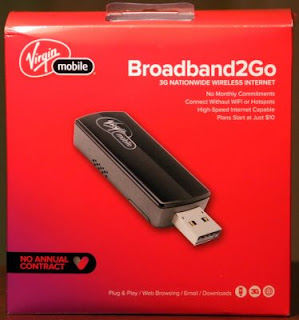
    America, on the other hand, has not discovered the beauty of prepaid mobile data (or more precisely should I say: pay-as-you-go mobile data). At least until recently... But I saw the light in this tunnel... appearing not to be a train :) Virgin Mobile, a virtual (MVNO) operator on top of the Sprint CDMA network, started offering the Broadband2Go prepaid data. I thought it a good fit for several reasons. First, it is based on a USB-stick type 3G cellular modem (Novatel MC760), so can be plugged to various machines needing connection. Surely I would prefer a MiFi style 3G-to-WiFi standalone portable router, but hey, I have been using USB for several years now and it is just fine. Second, it is Sprint/CDMA under the hood. The network with good rural coverage, certainly much better than AT&T. And that is important for outback travelers. Third, it is CDMA in its pure form, not the disabled WCDMA we have in the GSM world. I have not tried this personally before, but from the technological point of view it's EVDO Rel A variant should potentially offer a very good experience, while the 1xRTT mode should still be faster compared to GSM's EDGE.

    So on Friday, the day I arrived in New York (20 hours behind the original schedule, due to canceled connecting flight), I showed up at the Best Buy Mobile store at 750 7th Avenue, Manhattan to buy the Virgin Mobile Broadband2Go kit. The modem is $150, not cheap, but a must have. And then you have to "top it up" with some funds to select desired plan:
    • $10 will give you 100MB valid for 10 days
    • $20 will give you 250MB valid for 30 days
    • $40 will give you 600MB valid for 30 days
    • $60 will give you 1GB valid for 30 days
    As you may guess, I opted for the $60 option. 1GB is really not much these days, especially when you have two machines to consume that and folks on the other side of the Atlantic expect you to share pictures, blogs and other stuff real time...

    I thought prepaid (pay-as-you-go in America) should have been no strings and hooks attached... But I realized about the first problem while still in the shop. While credit card is the preferred way to fund the account, you can "top" it only with a credit card with an American billing address. I do not have one (BTW: why do they do that???). Therefore the only way to go was to buy top-up scratch cards. So I bought some together with the modem. $210 plus tax.

    Got back to my hotel room hoping for a quick and easy software installation. The Novatel MC760 when first plugged in, identifies itself as a storage device, containing the necessary setup files (Windows XP and Vista only, sorry, no Mac's). But to my despair the installation process did not get through. Windows was unable to find the necessary drivers... After disengaging the autopilot setup procedure, I took the matters in my own hands, the hands of an experienced software engineer. Three hours later I identified the problem and found the workaround. Your Windows machine has to be configured with US English (1033) as a default non-unicode language (you do that via the Control Panel). Otherwise the setup will fail. Hopeless... Virgin Mobile spends millions to create the new product, and brings it to the market with such a fundamental bug in the installer... Yeah I know many Americans just do not realize there are other nations on the Planet, but hey, even in New York you have so many nationalities mixed, I guess at least 10% of buyers will hit that problem... An there is no word of such limitation / requirement in the manual nor on the www.virginmobileusa.com web page. Luckily after changing temporarily my settings to US English, I managed to install the software and it recognized the modem. It reported the modem uninitialized, trying to connect to the network several times to set it up and failing. So the next workaround was to temporarily disable the Windows Firewall to let the Novatel software do its housekeeping tasks. After it registered the modem, the Broadband2Go web page was showing $0 credit on the account. I topped it using the scratch cards, but then even that it was showing $70 credit, it kept on reporting insufficient funds to activate the $60 plan. Imagine the $70 was reportedly not enough to activate the $10 plan. This time a browser restart was needed between topping up the account with scratch - cards and activating the desired plan. Finally I made it through. For hours. Should I charge Virgin Mobile now stating my usual hourly rate? At one point I was really close to give up... thinking of returning the whole thing back to the shop. But the inner soul of the software engineer inside persuaded me to try once more... And it worked.

    Having said the above, after the installation was done, I have really started enjoying the solution. First, it is fast. My subjective feeling is it is at least as fast as my DSL connection back home. Speedtest.NET reports 1,55Mb/s downlink and 0,39Mb/s uplink with 161ms latency (ping). Very good, and feels much faster compared to the HSDPA I often use in my home country. Second, it is fast, when it comes down to the connection setup time. The software can be configured to connect automatically when the USB modem is inserted. Nothing simpler. Plug it in and you are on line in a matter of just a few seconds. Much faster than the comparable procedure in the HSDPA world (but this may be vendor, not technology dependent, so I will try to find a HSDPA modem by Novatel to compare).

    I will be reporting how it works during my trip. Follow my Tweet at http://twitter.com/hdwrx. On Sunday we fly from NYC to Salt Lake City and then will be driving around Utah, Wyoming, Arizona, Nevada and California. If there are signs of life from my side, they will likely be transmitted using the Virgin Mobile's Broadband2Go. So far, it is two thumbs down for the installation and two thumbs up for the operation.

    And by the way - there are thousands of tourists coming down to USA every day. Many of them bring their laptops, to stay in touch and perform other tasks, like image sharing, tweeting,... Why o why there is just one pay-as-you-go mobile data offer? And why Virgin makes it so hard (almost impossible) to use by foreigners visiting America? Folks, rush to your tech departments, fix the installer first. Then repackage the thing and sell it at the airports. It will be hot... believe me...

    Labels: ,

    Sunday, June 14, 2009

    Otoy, OnLive, Gakai


    Some of you may wonder what the title means... Well... these are the names of three rising giants of the next generation electronic gaming battlefield. I laughed last week when I read somewhere the current game consoles will stay for next three years... Really? In the ever accelerating world full of innovation and with its event horizon shrinking, how anyone dares to predict something developed three years ago will stay for the next three unchallenged? Well... May be they are right, may be neither Sony nor Microsoft is able to reinvent gaming platforms... Actually this is quite likely, as progress very often comes from small challengers who bet everything on one card and have nothing but venture money :) to lose...

    So... Faithful readers should at least be familiar with Otoy, as I mentioned it and it's father, Jules Urbach, a number of times. Actually it was Otoy - related news last week that prompted me to touch base on the new developments in gaming. With rendering algorithms migrating to vector processing GPUs that are now becoming building blocks of next generation supercomputers, games can leave for the Cloud. That is exactly what Jules Urbach has been telling us for years - server based processing and scene composition / rendering plus a thin display component on a client device. What we are getting as a result from this architectural change is client device independence. Means we will no longer be tied to PS3s and X360s and HDMI screens. The same game, fully computed, correlated and rendered on the server side will run on almost any client device - be it a smart TV or a laptop or a cellphone.

    Architectural change will drive the change in business models. No more buying physical discs. No more buying or any other form of owning at all. Just participating , real role playing. In a mood for a combat? We will be pointing our client devices towards the virtual gaming worlds living in the Cloud and for a small change having the ability to entertain ourselves in a rich, fast moving virtual world of choice. Ultimately there will be no hardware gaming platforms, just gaming service providers. That will drive the cost of developing and selling games down with all resulting implications (consumers will pay less for more). Online games will blend with other forms of visual entertainment, such as Video On Demand and other video streaming / broadcasting services. At thos point it is really hard to predict who will come out victorious from this battle and for how long. One certain thing is the change will come and sooner than many expect. Another is we will consume even more bandwidth with even more appetite for quality of service (latency kills...). This will be just another contributing factor to the general bandwidth consumption trend. Cisco, Juniper, Alcatel, Huawei and their component vendors should celebrate already. Whatever they are able to deliver we will hapily consume...

    Labels:

    Sunday, June 07, 2009

    Glympse: The Way To Share Location Data


    A while ago Google launched the Latitude service. As usually, I rushed to download and set it up on my BlackBerry. But then soon I realized I was not going to use it... The reason? They moved a bridge too far in the area of privacy (or lack of it...). What Latitude does it allows you to share your physical location with selected friends. At start this model did not look attractive for me. I did not feel comfortable exposing my physical location. Even to a couple of good friends of mine. Later on Google implemented a few changes in the Latitude, on of them was ability to share just a city you were in, instead of your exact whereabouts down to a couple of meters. But it still was not right... I was not sure why, not spending too much time contemplating why I was still not willing to turn the Latitude on.

    And then I've come across Glympse. I have to admit I do not use Glympse either, but for a different reason - it is officially available on the Android platform, while a BlackBerry version is in the works. But the information sharing model offered by Glympse is much better. Instead of defining who can access your location information, you explicitly send a "glympse" to selected recipient, having a choice for it to be a one - time only or allowing the receiving party to access your location for specified amount of time. The Glympses you send can be addressed by an email address or a mobile phone number and they carry a link to a map on a web page, not forcing the recipients to have Glympse software installed - another nice advantage over Latitude.

    Glympse solves the very frequent problem (or a need) to communicate "my" location to selected other parties. On demand. I am really looking forward to the BlackBerry version.

    Labels: